$ cargo run Compiling panic v0.1.0 (file:///projects/panic) Finished dev [unoptimized + debuginfo] target(s) in 0.25s Running `target/debug/panic` thread 'main' panicked at 'crash and burn', src/main.rs:2:5 note: Run with `RUST_BACKTRACE=1` for a backtrace.
$ cargo run Compiling panic v0.1.0 (file:///projects/panic) Finished dev [unoptimized + debuginfo] target(s) in 0.27s Running `target/debug/panic` thread 'main' panicked at 'index out of bounds: the len is 3 but the index is 99', libcore/slice/mod.rs:2448:10 note: Run with `RUST_BACKTRACE=1` for a backtrace.
$ RUST_BACKTRACE=1 cargo run Finished dev [unoptimized + debuginfo] target(s) in 0.00s Running `target/debug/panic` thread 'main' panicked at 'index out of bounds: the len is 3 but the index is 99', libcore/slice/mod.rs:2448:10 stack backtrace: 0: std::sys::unix::backtrace::tracing::imp::unwind_backtrace at libstd/sys/unix/backtrace/tracing/gcc_s.rs:49 1: std::sys_common::backtrace::print at libstd/sys_common/backtrace.rs:71 at libstd/sys_common/backtrace.rs:59 2: std::panicking::default_hook::{{closure}} at libstd/panicking.rs:211 3: std::panicking::default_hook at libstd/panicking.rs:227 4: <std::panicking::begin_panic::PanicPayload<A> as core::panic::BoxMeUp>::get at libstd/panicking.rs:476 5: std::panicking::continue_panic_fmt at libstd/panicking.rs:390 6: std::panicking::try::do_call at libstd/panicking.rs:325 7: core::ptr::drop_in_place at libcore/panicking.rs:77 8: core::ptr::drop_in_place at libcore/panicking.rs:59 9: <usize as core::slice::SliceIndex<[T]>>::index at libcore/slice/mod.rs:2448 10: core::slice::<impl core::ops::index::Index<I> for [T]>::index at libcore/slice/mod.rs:2316 11: <alloc::vec::Vec<T> as core::ops::index::Index<I>>::index at liballoc/vec.rs:1653 12: panic::main at src/main.rs:4 13: std::rt::lang_start::{{closure}} at libstd/rt.rs:74 14: std::panicking::try::do_call at libstd/rt.rs:59 at libstd/panicking.rs:310 15: macho_symbol_search at libpanic_unwind/lib.rs:102 16: std::alloc::default_alloc_error_hook at libstd/panicking.rs:289 at libstd/panic.rs:392 at libstd/rt.rs:58 17: std::rt::lang_start at libstd/rt.rs:74 18: panic::main
thread 'main' panicked at 'called `Result::unwrap()` on an `Err` value: Error { repr: Os { code: 2, message: "No such file or directory" } }', src/libcore/result.rs:906:4
thread 'main' panicked at 'Failed to open hello.txt: Error { repr: Os { code: 2, message: "No such file or directory" } }', src/libcore/result.rs:906:4
因为这个错误信息以我们指定的文本开始,Failed to open hello.txt,将会更容易找到代码中的错误信息来自何处。如果在多处使用 unwrap,则需要花更多的时间来分析到底是哪一个 unwrap 造成了 panic,因为所有的 unwrap 调用都打印相同的信息。
首先让我们看看函数的返回值:Result<String, io::Error>。这意味着函数返回一个 Result<T, E> 类型的值,其中泛型参数 T 的具体类型是 String,而 E 的具体类型是 io::Error。如果这个函数没有出任何错误成功返回,函数的调用者会收到一个包含 String 的 Ok 值 —— 函数从文件中读取到的用户名。如果函数遇到任何错误,函数的调用者会收到一个 Err 值,它储存了一个包含更多这个问题相关信息的 io::Error 实例。这里选择 io::Error 作为函数的返回值是因为它正好是函数体中那两个可能会失败的操作的错误返回值:File::open 函数和 read_to_string 方法。
函数体以 File::open 函数开头。接着使用 match 处理返回值 Result,类似于示例 9-4 中的 match,唯一的区别是当 Err 时不再调用 panic!,而是提早返回并将 File::open 返回的错误值作为函数的错误返回值传递给调用者。如果 File::open 成功了,我们将文件句柄储存在变量 f 中并继续。
接着我们在变量 s 中创建了一个新 String 并调用文件句柄 f 的 read_to_string 方法来将文件的内容读取到 s 中。read_to_string 方法也返回一个 Result 因为它也可能会失败:哪怕是 File::open 已经成功了。所以我们需要另一个 match 来处理这个 Result:如果 read_to_string 成功了,那么这个函数就成功了,并返回文件中的用户名,它现在位于被封装进 Ok 的 s 中。如果 read_to_string 失败了,则像之前处理 File::open 的返回值的 match 那样返回错误值。不过并不需要显式的调用 return,因为这是函数的最后一个表达式。
use std::io; use std::io::Read; use std::fs::File;
fnread_username_from_file() ->Result<String, io::Error> { letmut f = File::open("hello.txt")?; letmut s = String::new(); f.read_to_string(&mut s)?; Ok(s) }
示例 9-7:一个使用 ? 运算符向调用者返回错误的函数
Result 值之后的 ? 被定义为与示例 9-6 中定义的处理 Result 值的 match 表达式有着完全相同的工作方式。如果 Result 的值是 Ok,这个表达式将会返回 Ok 中的值而程序将继续执行。如果值是 Err,Err 将作为整个函数的返回值,就好像使用了 return 关键字一样,这样错误值就被传播给了调用者。
示例 9-6 中的 match 表达式与问号运算符所做的有一点不同:? 运算符所使用的错误值被传递给了 from 函数,它定义于标准库的 From trait 中,其用来将错误从一种类型转换为另一种类型。当 ? 运算符调用 from 函数时,收到的错误类型被转换为由当前函数返回类型所指定的错误类型。这在当函数返回单个错误类型来代表所有可能失败的方式时很有用,即使其可能会因很多种原因失败。只要每一个错误类型都实现了 from 函数来定义如何将自身转换为返回的错误类型,? 运算符会自动处理这些转换。
error[E0277]: the trait bound `std::string::String: std::ops::Index<{integer}>` is not satisfied --> | 3 | let h = s1[0]; | ^^^^^ the type `std::string::String` cannot be indexed by `{integer}` | = help: the trait `std::ops::Index<{integer}>` is not implemented for `std::string::String`
$ cargo build Compiling restaurant v0.1.0 (file:///projects/restaurant) error[E0603]: function `add_to_waitlist` is private --> src/lib.rs:9:37 | 9 | crate::front_of_house::hosting::add_to_waitlist(); | ^^^^^^^^^^^^^^^ private function | note: the function `add_to_waitlist` is defined here --> src/lib.rs:3:9 | 3 | fn add_to_waitlist() {} | ^^^^^^^^^^^^^^^^^^^^
error[E0603]: function `add_to_waitlist` is private --> src/lib.rs:12:30 | 12 | front_of_house::hosting::add_to_waitlist(); | ^^^^^^^^^^^^^^^ private function | note: the function `add_to_waitlist` is defined here --> src/lib.rs:3:9 | 3 | fn add_to_waitlist() {} | ^^^^^^^^^^^^^^^^^^^^
For more information about this error, try `rustc --explain E0603`. error: could not compile `restaurant` due to 2 previous errors
私有 vs 公用: 一个模块里的代码默认对其父模块私有。为了使一个模块公用,应当在声明时使用 pub mod 替代 mod。为了使一个公用模块内部的成员公用,应当在声明前使用pub。
use 关键字: 在一个作用域内,use关键字创建了一个项的快捷方式,用来减少长路径的重复。在任何可以引用 crate::garden::vegetables::Asparagus 的作用域,你可以通过 use crate::garden::vegetables::Asparagus; 创建一个快捷方式,然后你就可以在作用域中只写 Asparagus 来使用该类型。
在餐饮业,餐馆中会有一些地方被称之为前台(front of house),还有另外一些地方被称之为后台(back of house)。前台是招待顾客的地方;这包括接待员为顾客安排座位、服务员接受点单和付款、调酒师制作饮品的地方。后台则是厨师和烹饪人员在厨房工作、洗碗工清理餐具,以及经理处理行政事务的区域。
这个树展示了一些模块是如何被嵌入到另一个模块的(例如,hosting 嵌套在 front_of_house 中)。这个树还展示了一些模块是互为兄弟(siblings)的,这意味着它们定义在同一模块中;hosting 和 serving 被一起定义在 front_of_house 中。继续沿用家庭关系的比喻,如果一个模块 A 被包含在模块 B 中,我们将模块 A 称为模块 B 的 子(child)模块,模块 B 则是模块 A 的 父(parent)模块。注意,整个模块树都植根于名为 crate 的隐式模块下。
C 语言: C 语言没有内置的命名空间机制,通常通过前缀(例如 my_library_function)来避免不同库之间的命名冲突。头文件的路径管理也相对简单,就是文件系统的路径。
Rust: Rust 的模块系统本身就提供了强大的命名空间管理。每个模块都有自己的路径,例如 crate::module_name::sub_module::item。通过 use 关键字,我们可以引入特定的项到当前作用域,或者使用 as 关键字为引入的项创建别名,从而解决潜在的命名冲突。这种基于路径的命名空间机制使得代码组织更加清晰和安全。
文件与模块的对应关系:
C 语言: 通常一个 .c 文件对应一个独立的编译单元,并可能有一个对应的 .h 文件用于声明接口。
Rust: 在 Rust 中,一个文件可以包含多个模块,或者一个模块可以分散在多个文件中(通过 mod name; 语法)。Rust 的文件系统布局约定是模块系统的一部分,例如,一个 mod foo; 声明会查找 foo.rs 文件或 foo/mod.rs 目录来加载模块内容。这种灵活的对应关系使得代码组织可以更好地反映逻辑结构。
$ cargo run Compiling enums v0.1.0 (file:///projects/enums) error[E0277]: cannot add `Option<i8>` to `i8` --> src/main.rs:5:17 | 5 | let sum = x + y; | ^ no implementation for `i8 + Option<i8>` | = help: the trait `Add<Option<i8>>` is not implemented for `i8` = help: the following other types implement trait `Add<Rhs>`: `&i8` implements `Add<i8>` `&i8` implements `Add` `i8` implements `Add<&i8>` `i8` implements `Add`
For more information about this error, try `rustc --explain E0277`. error: could not compile `enums` (bin "enums") due to 1 previous error
fn main() { let file_content = Some(String::from("Some text in the file.")); let content = file_content.expect("文件内容不存在!"); println!("文件内容: {}", content);
let empty_file: Option<String> = None; // let empty_content = empty_file.expect("读取文件失败,文件为空或不存在。"); // 这行代码会导致 panic! }
Rust 有一个叫做 match 的极为强大的控制流运算符,它允许我们将一个值与一系列的模式相比较,并根据相匹配的模式执行相应代码。模式可由字面值、变量、通配符和许多其他内容构成;第十九章会涉及到所有不同种类的模式以及它们的作用。match 的力量来源于模式的表现力,以及编译器能够确认所有可能情况均已被覆盖。
可以把 match 表达式想象成某种硬币分类器:硬币滑入有着不同大小孔洞的轨道,每一个硬币都会掉入符合它大小的孔洞。同样地,值也会通过 match 的每一个模式,并且在遇到第一个 “符合” 的模式时,值会进入相关联的代码块并在执行中被使用。
因为刚刚提到了硬币,让我们用它们来作为一个使用 match 的例子!我们可以编写一个函数来获取一个未知的美国硬币,并以一种类似验钞机的方式,确定它是何种硬币并返回它的美分值,如示例 6-3 中所示。
$ cargo run Compiling enums v0.1.0 (file:///projects/enums) error[E0004]: non-exhaustive patterns: `None` not covered --> src/main.rs:3:15 | 3 | match x { | ^ pattern `None` not covered | note: `Option<i32>` defined here --> /rustc/4eb161250e340c8f48f66e2b929ef4a5bed7c181/library/core/src/option.rs:572:1 ::: /rustc/4eb161250e340c8f48f66e2b929ef4a5bed7c181/library/core/src/option.rs:576:5 | = note: not covered = note: the matched value is of type `Option<i32>` help: ensure that all possible cases are being handled by adding a match arm with a wildcard pattern or an explicit pattern as shown | 4 ~ Some(i) => Some(i + 1), 5 ~ None => todo!(), |
For more information about this error, try `rustc --explain E0004`. error: could not compile `enums` (bin "enums") due to 1 previous error
注意 black 和 origin 值的类型不同,因为它们是不同的元组结构体的实例。你定义的每一个结构体有其自己的类型,即使结构体中的字段可能有着相同的类型。例如,一个获取 Color 类型参数的函数不能接受 Point 作为参数,即便这两个类型都由三个 i32 值组成。除此之外,元组结构体实例类似于元组,你可以将它们解构为单独的部分,也可以使用 . 后跟索引来访问单独的值。与元组不同的是,解构元组结构体时必须写明结构体的类型。例如,我们可以写 let Point(x, y, z) = origin;,将 origin 的值解构到名为 x、y 和 z 的变量中。
println!("The result is: {}", result); // 输出: The result is: 20 println!("The final counter value is: {}", counter); // 输出: The final counter value is: 10 }
栈和堆都是代码在运行时可供使用的内存,但是它们的结构不同。栈以放入值的顺序存储值并以相反顺序取出值。这也被称作 后进先出(last in, first out)。想象一下一叠盘子:当增加更多盘子时,把它们放在盘子堆的顶部,当需要盘子时,也从顶部拿走。不能从中间也不能从底部增加或拿走盘子!增加数据叫做 入栈(pushing onto the stack),而移出数据叫做 出栈(popping off the stack)。栈中的所有数据都必须占用已知且固定的大小。在编译时大小未知或大小可能变化的数据,要改为存储在堆上。
堆是缺乏组织的:当向堆放入数据时,你要请求一定大小的空间。内存分配器(memory allocator)在堆的某处找到一块足够大的空位,把它标记为已使用,并返回一个表示该位置地址的 指针(pointer)。这个过程称作 在堆上分配内存(allocating on the heap),有时简称为 “分配”(allocating)。(将数据推入栈中并不被认为是分配)。因为指向放入堆中数据的指针是已知的并且大小是固定的,你可以将该指针存储在栈上,不过当需要实际数据时,必须访问指针。想象一下去餐馆就座吃饭。当进入时,你说明有几个人,餐馆员工会找到一个够大的空桌子并领你们过去。如果有人来迟了,他们也可以通过询问来找到你们坐在哪。
访问堆上的数据比访问栈上的数据慢,因为必须通过指针来访问。现代处理器在内存中跳转越少就越快。继续类比,假设有一个服务员在餐厅里处理多个桌子的点菜。在一个桌子报完所有菜后再移动到下一个桌子是最有效率的。从桌子 A 听一个菜,接着桌子 B 听一个菜,然后再桌子 A,然后再桌子 B 这样的流程会更加缓慢。出于同样原因,处理器在处理的数据彼此较近的时候(比如在栈上)比较远的时候(比如可能在堆上)更高效。
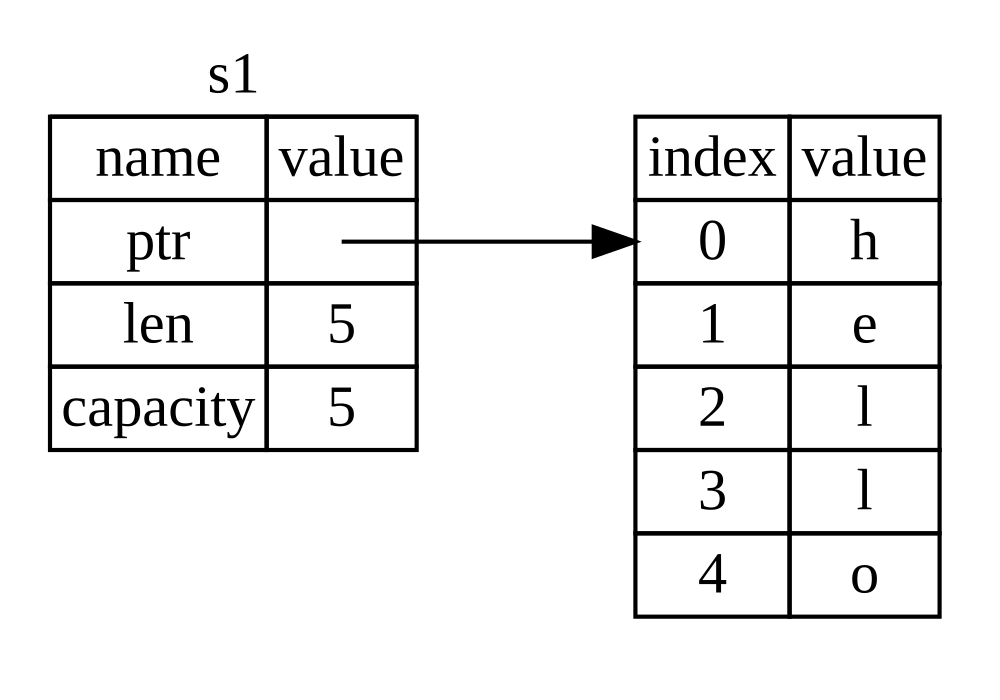
我们已经见过字符串字面值,即被硬编码进程序里的字符串值。字符串字面值是很方便的,不过它们并不适合使用文本的每一种场景。原因之一就是它们是不可变的。另一个原因是并非所有字符串的值都能在编写代码时就知道:例如,要是想获取用户输入并存储该怎么办呢?为此,Rust 有另一种字符串类型,String。这个类型管理被分配到堆上的数据,所以能够存储在编译时未知大小的文本。可以使用 from 函数基于字符串字面值来创建 String,如下:
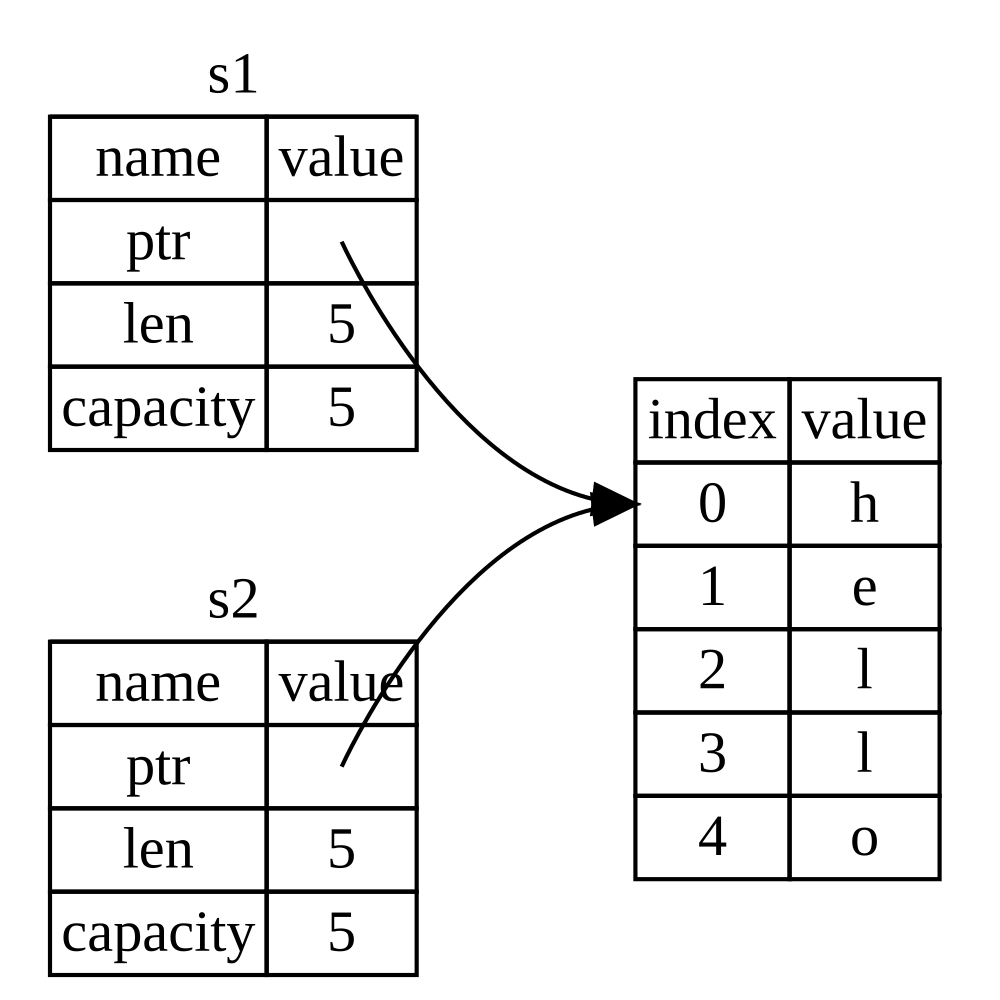
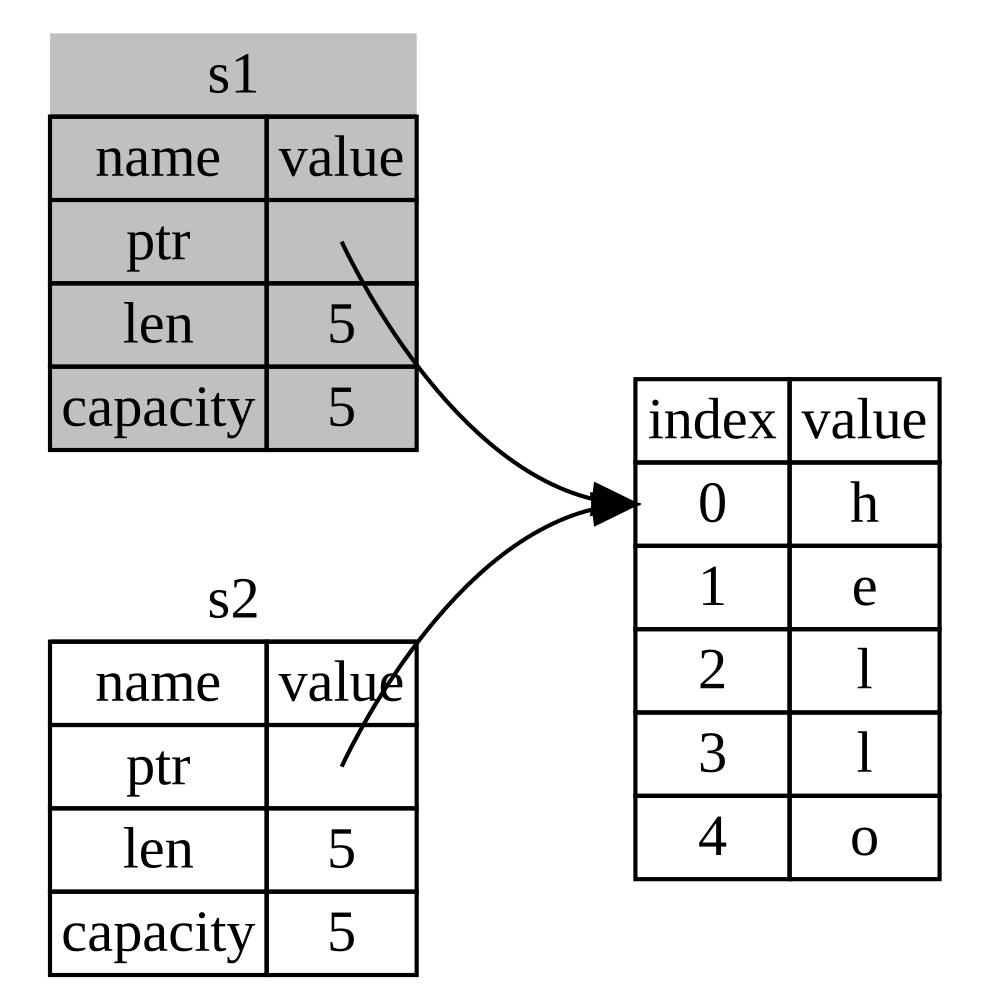
$ cargo run Compiling ownership v0.1.0 (file:///projects/ownership) error[E0382]: borrow of moved value: `s1` --> src/main.rs:5:15 | 2 | let s1 = String::from("hello"); | -- move occurs because `s1` has type `String`, which does not implement the `Copy` trait 3 | let s2 = s1; | -- value moved here 4 | 5 | println!("{s1}, world!"); | ^^^^ value borrowed here after move | = note: this error originates in the macro `$crate::format_args_nl` which comes from the expansion of the macro `println` (in Nightly builds, run with -Z macro-backtrace for more info) help: consider cloning the value if the performance cost is acceptable | 3 | let s2 = s1.clone(); | ++++++++
For more information about this error, try `rustc --explain E0382`. error: could not compile `ownership` (bin "ownership") due to 1 previous error
$ cargo run Compiling ownership v0.1.0 (file:///projects/ownership) error[E0596]: cannot borrow `*some_string` as mutable, as it is behind a `&` reference --> src/main.rs:8:5 | 8 | some_string.push_str(", world"); | ^^^^^^^^^^^ `some_string` is a `&` reference, so the data it refers to cannot be borrowed as mutable | help: consider changing this to be a mutable reference | 7 | fn change(some_string: &mut String) { | +++
For more information about this error, try `rustc --explain E0596`. error: could not compile `ownership` (bin "ownership") due to 1 previous error
可变引用有一个很大的限制:如果你有一个对该变量的可变引用,你就不能再创建对该变量的引用。这些尝试创建两个 s 的可变引用的代码会失败:
1 2 3 4 5 6
letmut s = String::from("hello");
letr1 = &mut s; letr2 = &mut s;
println!("{}, {}", r1, r2);
错误如下:
1 2 3 4 5 6 7 8 9 10 11 12 13 14 15
$ cargo run Compiling ownership v0.1.0 (file:///projects/ownership) error[E0499]: cannot borrow `s` as mutable more than once at a time --> src/main.rs:5:14 | 4 | let r1 = &mut s; | ------ first mutable borrow occurs here 5 | let r2 = &mut s; | ^^^^^^ second mutable borrow occurs here 6 | 7 | println!("{}, {}", r1, r2); | -- first borrow later used here
For more information about this error, try `rustc --explain E0499`. error: could not compile `ownership` (bin "ownership") due to 1 previous error
$ cargo run Compiling ownership v0.1.0 (file:///projects/ownership) error[E0502]: cannot borrow `s` as mutable because it is also borrowed as immutable --> src/main.rs:6:14 | 4 | let r1 = &s; // no problem | -- immutable borrow occurs here 5 | let r2 = &s; // no problem 6 | let r3 = &mut s; // BIG PROBLEM | ^^^^^^ mutable borrow occurs here 7 | 8 | println!("{}, {}, and {}", r1, r2, r3); | -- immutable borrow later used here
For more information about this error, try `rustc --explain E0502`. error: could not compile `ownership` (bin "ownership") due to 1 previous error
$ cargo run Compiling ownership v0.1.0 (file:///projects/ownership) error[E0106]: missing lifetime specifier --> src/main.rs:5:16 | 5 | fn dangle() -> &String { | ^ expected named lifetime parameter | = help: this function's return type contains a borrowed value, but there is no value for it to be borrowed from help: consider using the `'static` lifetime, but this is uncommon unless you're returning a borrowed value from a `const` or a `static` | 5 | fn dangle() -> &'static String { | +++++++ help: instead, you are more likely to want to return an owned value | 5 - fn dangle() -> &String { 5 + fn dangle() -> String { |
error[E0515]: cannot return reference to local variable `s` --> src/main.rs:8:5 | 8 | &s | ^^ returns a reference to data owned by the current function
Some errors have detailed explanations: E0106, E0515. For more information about an error, try `rustc --explain E0106`. error: could not compile `ownership` (bin "ownership") due to 2 previous errors
fnmain() { letmut s = String::from("hello world");
letword = first_word(&s);
s.clear(); // 错误!
println!("the first word is: {word}"); }
这里是编译错误:
1 2 3 4 5 6 7 8 9 10 11 12 13 14 15 16
$ cargo run Compiling ownership v0.1.0 (file:///projects/ownership) error[E0502]: cannot borrow `s` as mutable because it is also borrowed as immutable --> src/main.rs:18:5 | 16 | let word = first_word(&s); | -- immutable borrow occurs here 17 | 18 | s.clear(); // error! | ^^^^^^^^^ mutable borrow occurs here 19 | 20 | println!("the first word is: {word}"); | ------ immutable borrow later used here
For more information about this error, try `rustc --explain E0502`. error: could not compile `ownership` (bin "ownership") due to 1 previous error
回忆一下借用规则,当拥有某值的不可变引用时,就不能再获取一个可变引用。因为 clear 需要清空 String,它尝试获取一个可变引用。在调用 clear 之后的 println! 使用了 word 中的引用,所以这个不可变的引用在此时必须仍然有效。Rust 不允许 clear 中的可变引用和 word 中的不可变引用同时存在,因此编译失败。Rust 不仅使得我们的 API 简单易用,也在编译时就消除了一整类的错误!